Check Sharpsum against Shopify's reports
Sales match Shopify's reports to the cent: how to compare them, and the differences you choose.
-
Step 1
Pick the same days
Choose the same dates on the Profit page and in Shopify's analytics. Both use your store's time zone, so each day holds the same orders.
-
Step 2
Compare the sales
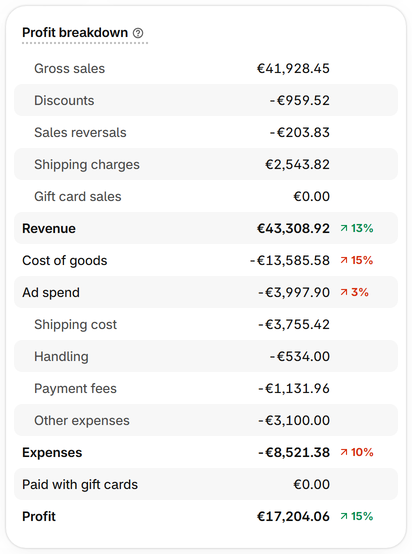
Profit breakdown shows gross sales, discounts, sales reversals and shipping charges as Shopify's sales reports count them. Compare them in your store's own currency.
-
Step 3
Compare the cost of goods
Cost of goods is the cost Shopify recorded for each sale, as in Shopify's profit reports, except where you set your own on Product costs.
-
Step 4
Know the differences you choose
By default gift cards count when they are sold, and Shopify's reports count them when they are spent: Settings can count them as Shopify does. Figures in another main currency are turned at Shopify's rate for each day.
-
Step 5
Tell us about a day that differs
If a day still differs, write to support@manum.lv with the day and the figure, and we'll check it against your orders.
