Numbers you can check
Sales are counted exactly as Shopify's own reports count them. Gift cards are the one difference, and you choose it. The cost of goods sold is the one Shopify recorded at the moment of each sale.
Profit analytics for Shopify
Sharpsum turns your orders into a profit report for any day, product and order: revenue as Shopify's own reports count it, minus the cost of goods sold, shipping, payment fees, ad spend and the expenses you add. Gift cards are the one difference, and you choose it.

Sales are counted exactly as Shopify's own reports count them. Gift cards are the one difference, and you choose it. The cost of goods sold is the one Shopify recorded at the moment of each sale.
Shipping by destination, each payment provider's fees, Shopify's transaction fee and your own expenses, with VAT you reclaim left out.
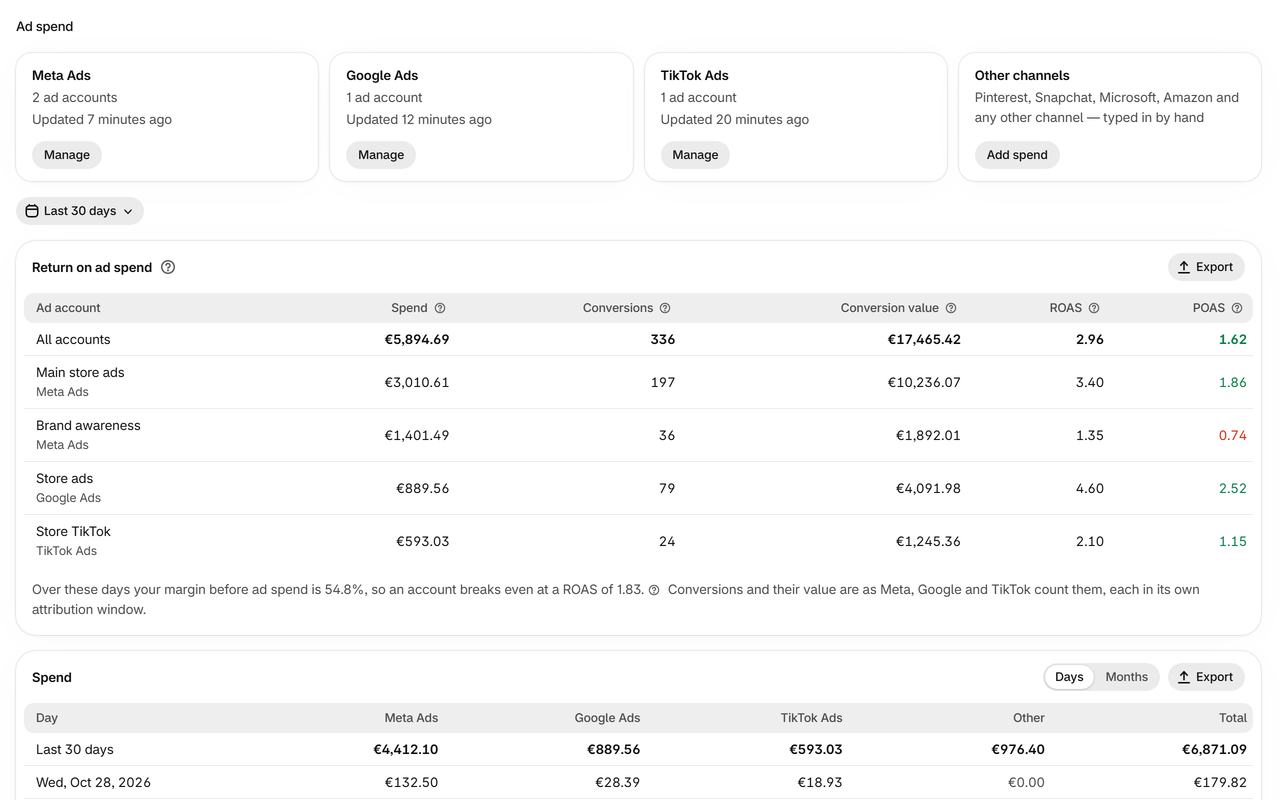
Ad spend is read for you as often as your ad platforms update it, every 3 hours on Free. See ROAS, POAS and the break-even ROAS for each ad account.
Profit by product, variant, vendor, collection, sales channel, point of sale location, country and for every single order.
Install it and your orders from this month and the two before are read. A five-step guide sets up costs, shipping and fees.
Sharpsum speaks 25 languages, and each person on your team chooses their own.
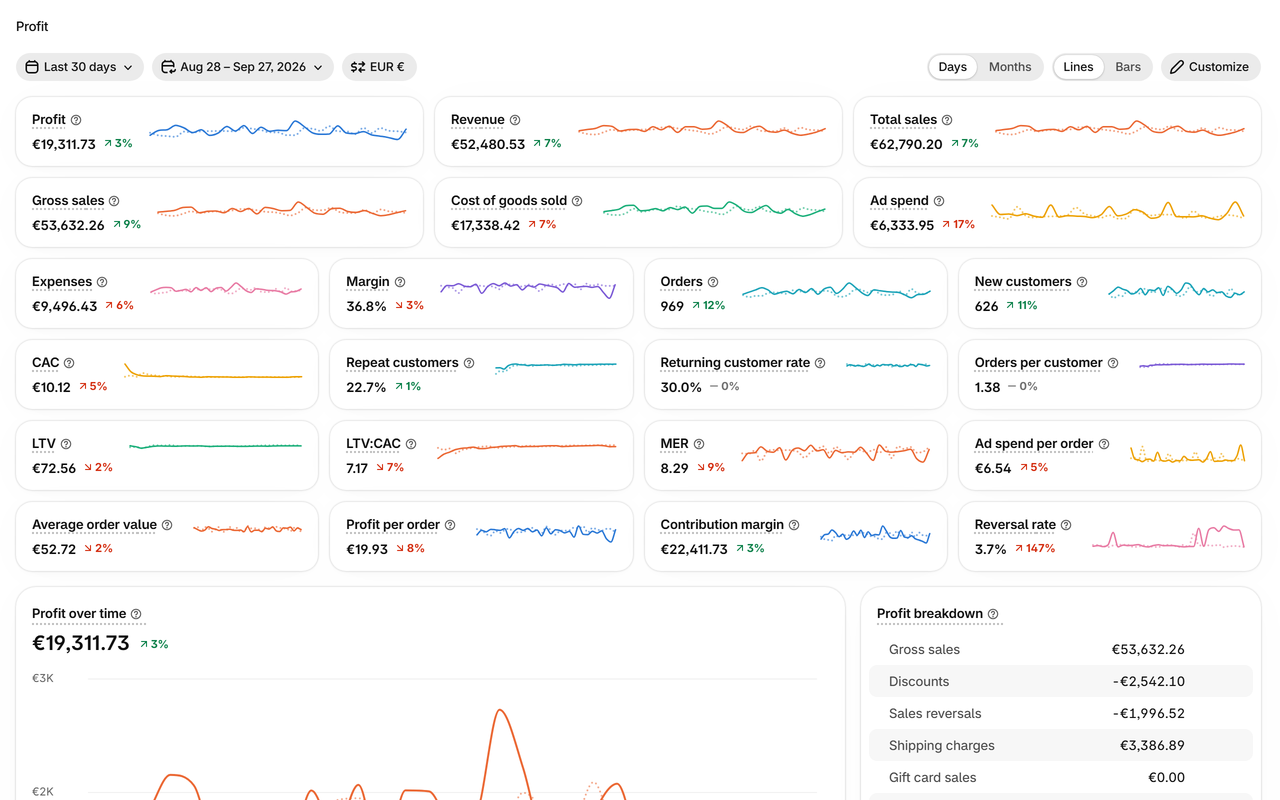
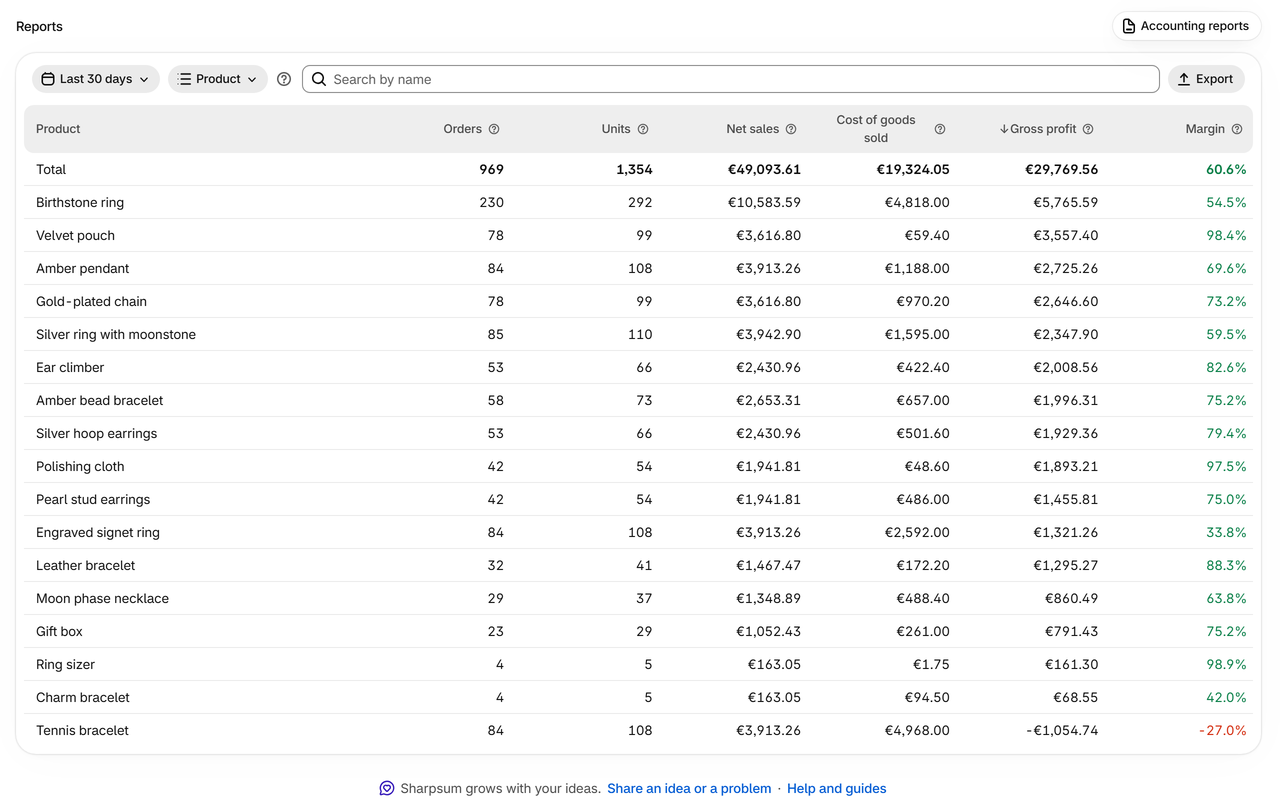
These are Sharpsum's own screens, with a made-up store's figures.
Profit, revenue, costs and margin for any period, with a chart and a comparison with an earlier period. Choose which figures to see and in what order.
Profit by product, variant, type, vendor, tag, collection, channel, point of sale location and country, and every order with its own profit.

Your own cost for a variant from any date, or rules by product type, vendor, tag or collection. Import and export them as a spreadsheet.

Ad platforms read by themselves, other channels by hand, with ROAS and POAS for each account.

Rent, salaries, apps and other costs, once or recurring, as an amount, per order or as a share of revenue, in any currency.

Shipping, handling, payment fees, returns and gift cards counted the way your business counts them.

The whole picture of what your store earns, in one app that keeps itself up to date.
Everyone in your store picks the cards they see on the Profit page and their order: margin and ROAS first for one, orders and lifetime value for another.
25 languages. Each person chooses theirs, and Sharpsum speaks it to them from then on, whatever the others choose.
Any day, week, month or year, or the whole history, set against the period before or the same days a year earlier, each card with its change and trend.
Sharpsum points out when profit falls, ad spend jumps, sales reversals rise, a product sells at a loss or an item sells without a cost.
By product, variant, product type, vendor, tag and collection; by sales channel, point of sale location, country and order. Sort it, search it, export it.
Meta, Google Ads, TikTok Ads and Shopify's own Shop Campaigns read by themselves, every other channel typed in, with ROAS, POAS, the break-even ROAS and the cost of a new customer.
The cost Shopify recorded at each sale, or your own cost for a variant from any date, rules by tag, type, vendor or collection, and costs from a spreadsheet.
Shopify Payments fees as charged on each order, your rates for other providers, Shopify's transaction fee, shipping labels at what Shopify charged, and shipping and handling by your rules.
Rent, salaries, apps: once or recurring, as an amount, per order or a share of revenue, VAT left out, spread over the days or on the day it is due.
New and returning customers, orders per customer, lifetime value and LTV:CAC, as Shopify counts them.
Every figure in your store's currency or another one, each day at the rate Shopify's own reports use; expenses and ad spend in their own.
Reports, orders, product costs, ad spend and expenses go to a spreadsheet in one click.
Each month's orders, refunds and taxes by country and rate, as CSV, XLSX or PDF, in the language your accountant reads.
Tell Sharpsum since when you are registered for OSS, and each sale to a consumer in another EU country goes in the return it belongs in.
Close a month once you file its VAT return, and its report stays as it is. Say how often you file, and each month closes by itself once the last day to file it is over.
Every page works on a phone, in the Shopify app or a browser, with the same figures as on a computer.
A new or changed order shows within a minute, and a refund or an edit counts on the day it happens, as in Shopify's reports.
Gross sales, discounts, sales reversals, net sales, shipping and taxes counted the way Shopify's own reports count them, day by day.
This month and the two before as soon as you install, and once you pay for a plan your whole order history, read in the background.
No customer names, emails or addresses are kept. Each store's data is stored apart in the EU and deleted when you remove Sharpsum, from backups within 30 days.
Send an idea or a problem from any page, then follow its status and our reply right in Sharpsum.
Ask Sidekick in your Shopify admin on any plan, or connect Claude or ChatGPT from Growth up, and Claude Code, Cursor or a script of your own with an API key. They read only your store's figures, never customers' details. If you allow it, they also set Sharpsum up for you, and every change can be undone.
Each order's profit on its own page, each product's over the last 30 days, and Flow triggers every day, week and month, and for any order sold at a loss.
Gift cards counted when sold or when spent, returned items back in stock or written off, handling and point-of-sale orders by your rules. Change a choice and every past day follows.
A five-step guide on the Profit page: your language, ad accounts, costs checked against Shopify, shipping and fees, and fixed costs. Steps tick themselves off as you go.
Every question merchants ask, answered in the app in 25 languages, with search.
The Profit page, each person's own cards and language, product costs, payment fees, ad spend, expenses, reports and alerts.
Every plan counts profit the same way. Paid plans start with a 14-day free trial, and paying yearly gives two months free.
$0 a month
$19 a month
or $190 a year when paid yearly, two months free
$49 a month
or $490 a year when paid yearly, two months free
$99 a month
or $990 a year when paid yearly, two months free
Your store's profit for any period: revenue from your Shopify orders, minus the cost of the goods you sold, ad spend and expenses — shipping, handling, payment fees and the costs you enter.
Sales come from your Shopify orders and are counted the way Shopify's own reports count them: gross sales, discounts, sales reversals, shipping charges, taxes, cost of goods sold and orders match Shopify's reports to the cent. Gift cards are the one difference, and you choose it: by default Sharpsum counts their money when a card is sold, Shopify when it is spent. Ad spend comes from the ad accounts you connect and the spend you enter; expenses are what you enter on the Expenses page.
Profit is revenue minus the cost of goods sold, ad spend and expenses. Expenses are shipping cost, handling, payment fees and the costs you enter on the Expenses page. By default gift cards count when they are sold, so payments made with gift cards are taken off, and the same money does not count twice.
When it is installed, Sharpsum reads your orders from this month and the two before, and on the free plan and in a free trial you see those months; a store with more than 50,000 orders in them gets its latest days that hold that many. Once you pay for a plan, Sharpsum reads your whole order history in the background and the calendar reaches back to your first order.
Plans differ in how many orders a month they cover — Free 50, Starter 500, Growth 2,000, Pro 6,000 — in how much order history they show: this month and the two before on Free and in a free trial, every order once you pay — and in how often ad spend is read: every 3 hours on Free, and on the others as often as the platforms update it. From Growth up you can also ask Claude and ChatGPT about your figures; Sidekick answers on every plan. Everything else is on every plan. If nobody opens Sharpsum for 3 days, it reads every 6 hours and catches up the moment you open it. For more orders, we set up a plan for your store.
Order amounts, dates and IDs, the country and region orders went to, and what you enter in Sharpsum, kept in the European Union. It does not keep customers' names, emails or street addresses. When you uninstall Sharpsum, all of your store's data is deleted at once; only a record that your store installed and removed it stays, for three years. An AI assistant you connect reads your store's figures only when you ask it something.
Sharpsum reads orders, product costs and shop settings. It never keeps your customers' names, email addresses, phone numbers or street addresses.
Each store's data is kept apart from every other store's, encrypted, in Cloudflare's European Union jurisdiction.
Remove Sharpsum and your store's data is deleted at once, and from backups within 30 days. Only a record that your store installed and removed it stays, for three years.
10 guides, step by step and with the screens, from setting Sharpsum up to checking it against Shopify's reports.
Free for up to 50 orders a month. No account to create: Sharpsum runs inside your Shopify admin.