Ask AI about your profit
Ask in your own words: Sidekick in your Shopify admin, or Claude and ChatGPT with Sharpsum's address.
-
Step 1
Ask Sidekick in Shopify
Ask Sidekick in your Shopify admin, for example what your profit was last month by Sharpsum. It asks you before it uses Sharpsum, then reads the figures you see here. Sidekick answers on every plan.
-
Step 2
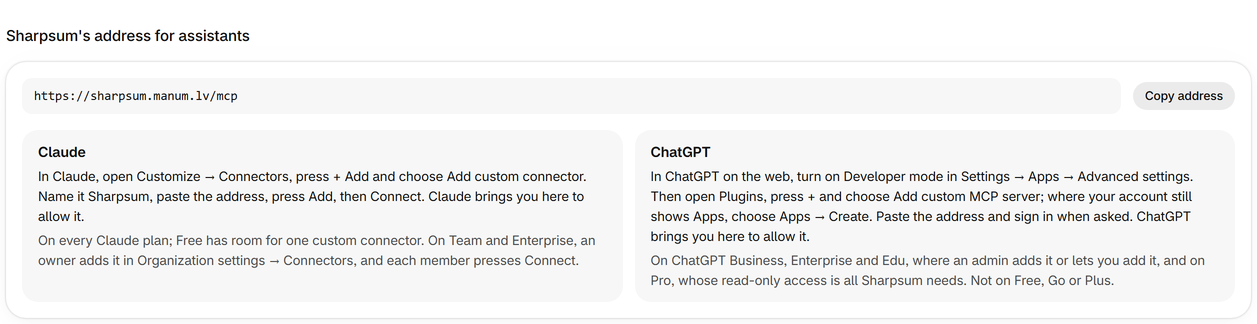
Copy Sharpsum's address
For Claude or ChatGPT, open Settings and press Connect an assistant under AI assistants, then copy the address. Claude and ChatGPT connect on the Growth and Pro plans.
-
Step 3
Add it to Claude
In Claude, open Customize → Connectors, press + Add and choose Add custom connector. Name it Sharpsum, paste the address, press Add, then Connect. Claude brings you here to allow it.
-
Step 4
Add it to ChatGPT
In ChatGPT on the web, turn on Developer mode in Settings → Apps → Advanced settings. Then open Plugins, press + and choose Add custom MCP server; where your account still shows Apps, choose Apps → Create. Paste the address and sign in when asked. ChatGPT brings you here to allow it.
-
Step 5
Allow it in Sharpsum
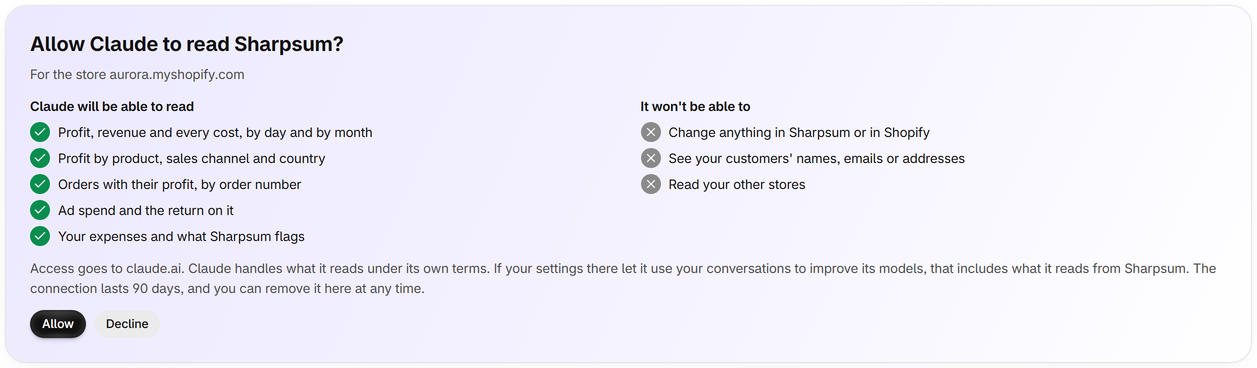
The assistant brings you back to Sharpsum in your Shopify admin, where you press Allow. It reads only this store's figures, never customers' names, emails or addresses, and can't change anything.
-
Step 6
Ask away, and disconnect at any time
Ask about profit, products, orders, ads or expenses for any days, such as which products lost money last month. AI assistants lists every connection, and Disconnect ends one at once.

