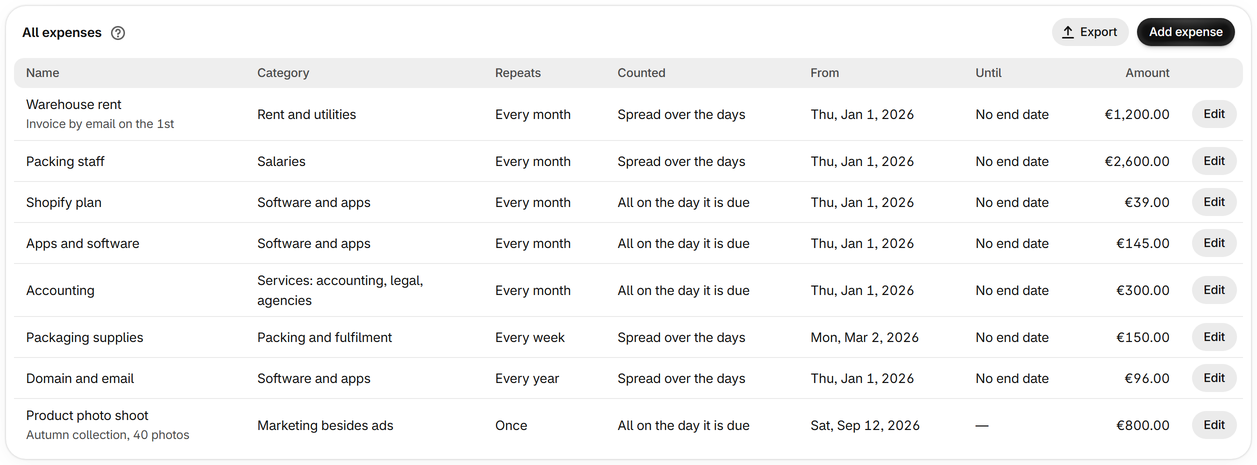
Add the costs of running your store
Everything besides goods and ads, from rent to a fee on each order, so profit is what you really keep.
-
Step 1
Add an expense
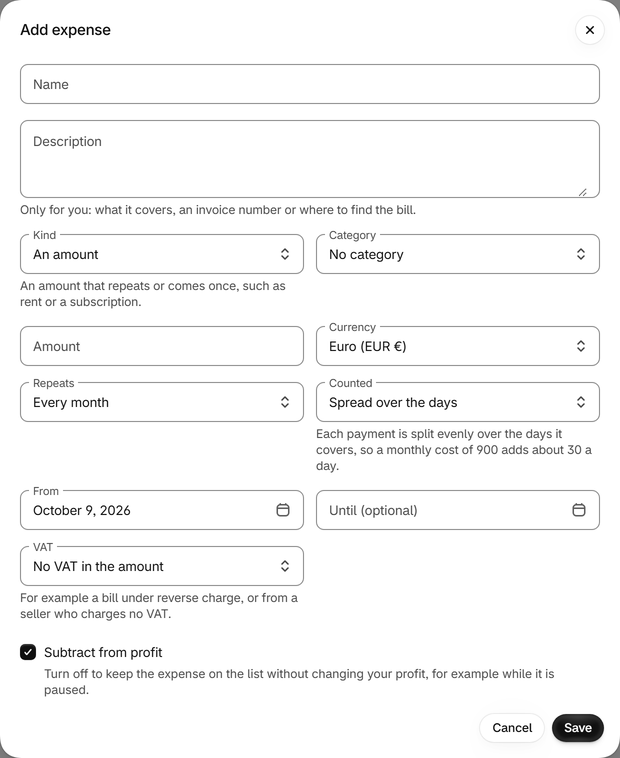
On Expenses, press Add expense, name it and choose a category, or make one of your own. The description is for your notes, such as where the invoice comes from.
-
Step 2
Choose how often it comes
Once, every day, every week, every month or every year, from the day it starts and, if it stops, until the day it ends.
-
Step 3
Spread it, or count it on the day
Spread over the days splits each payment evenly over the days it covers: a monthly cost of 900 adds about 30 a day. All on the day it is due counts the whole payment on that day.
-
Step 4
An amount for each order, or a share of revenue
For a fulfilment fee or a royalty, choose An amount for each order or A share of revenue in place of An amount.
-
Step 5
Set its VAT and currency
Say whether the amount includes VAT you get back, which is left out of the expense, or VAT you don't get back. An expense can be in any currency: Shopify's rate for each day turns it into yours.
-
Step 6
Pause one without deleting it
Turn off Subtract from profit to keep an expense on the list without changing your profit. Export saves the whole list as a CSV file.